For structural engineering firms

Run every project from intake to delivered report.

Structra is the system of record for intake, design, inspection, delivery and billing. It gives your clients and field inspectors their own portal, and it scales from a two-engineer practice to a multi-office firm.

  • Unlimited users on every plan
  • Client and field inspector portals included
  • QuickBooks Online invoicing
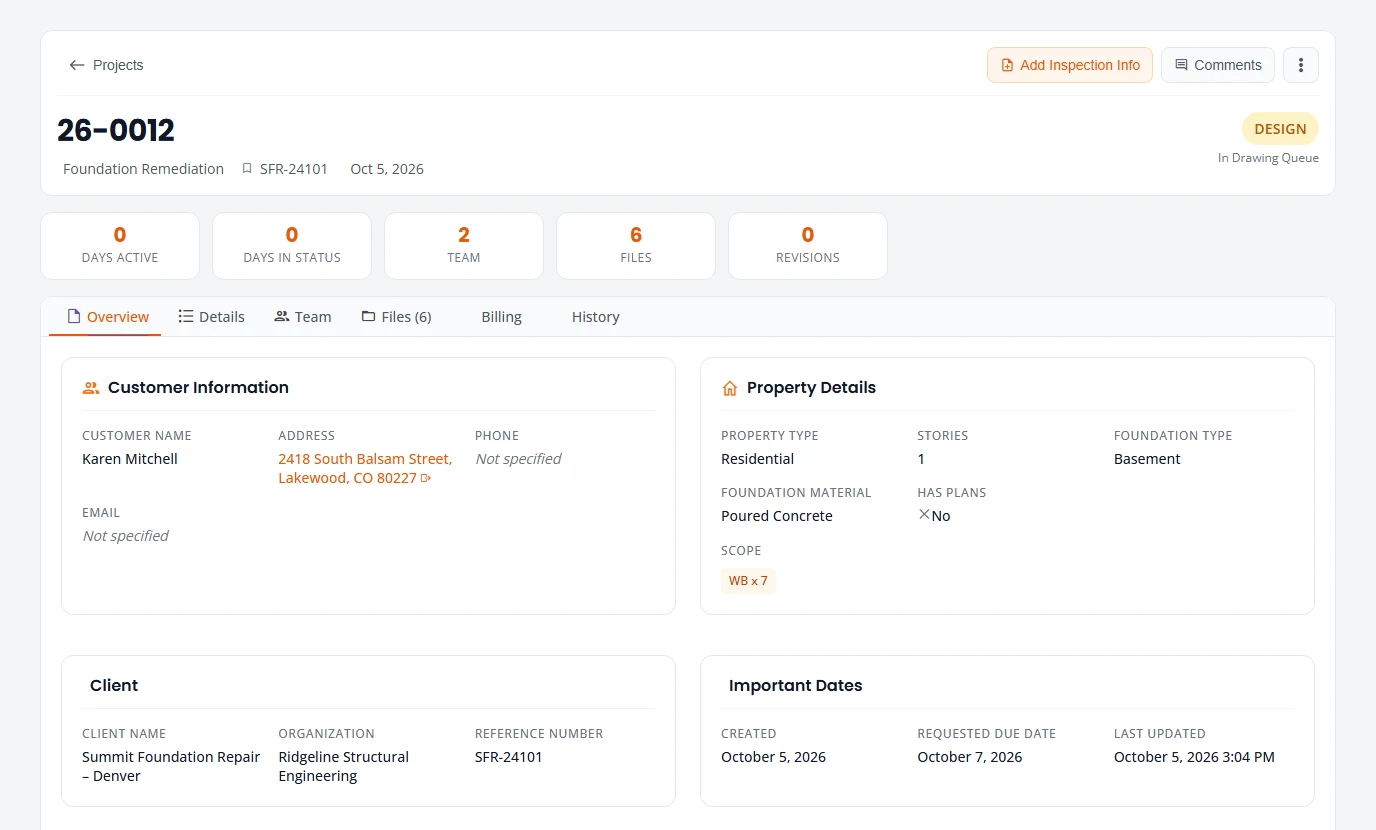
A Structra project record: customer, property details, client, important dates and status.
Project record in Structra. Demo data.

Built for firms of every size

The same platform runs a two-engineer practice and a multi-office firm. What changes is how you buy it and how much help you get setting it up.

Professional

Small and mid-size firms

Win the work, get it signed, deliver it and invoice it from one system, with your firm's name on every email and document. Billed monthly, with no annual commitment.

  • Leads from your website, and engagement letters signed electronically with an audit trail
  • Email from your domain and documents on your letterhead
  • QuickBooks Online invoicing at your own prices
What small firms get →

Enterprise

Multi-office and high-volume firms

Standardize intake, design review and inspection across offices and client branches, with the reporting leadership needs and the commercial terms procurement expects.

  • Annual agreement with volume project rates
  • Onboarding, configuration and data migration
  • Security review support and a named contact
Talk to sales →

For small and mid-size firms

From the first call to the paid invoice

A small firm runs on a few people doing everything. Structra takes the paperwork around the engineering, from the website inquiry to the invoice, and puts your firm's name on all of it.

  1. 01

    Win the work

    • Requests from your website form land on one Leads list
    • Phone calls, walk-ins and referrals entered in a minute
    • Each lead gets a short summary and the drive time from your office
    • Emergency and insurance jobs are tagged
  2. 02

    Get it signed

    • Engagement letter templates with merge fields and version history
    • The customer signs electronically on a phone or computer, no account needed
    • Every signed letter carries an audit certificate: when it was sent, viewed and signed, by whom, and from where
    • Signed copy emailed to the customer and to you
  3. 03

    Do the work

    • Convert a signed lead into a project with its scope and fee
    • Hourly or fixed-fee, scoped job by job, with no setup
    • Need a workflow built around your kind of work? Our team builds it with you
  4. 04

    Deliver

    • Send the sealed report by email or Dropbox
    • A send history on every project
    • Cover letters, change orders and revisions on your letterhead
  5. 05

    Get paid

    • Delivered work adds a line to the client's invoice at your prices
    • Finalize and send through QuickBooks Online, by hand or on a schedule
    • See which invoices are sent, paid or overdue
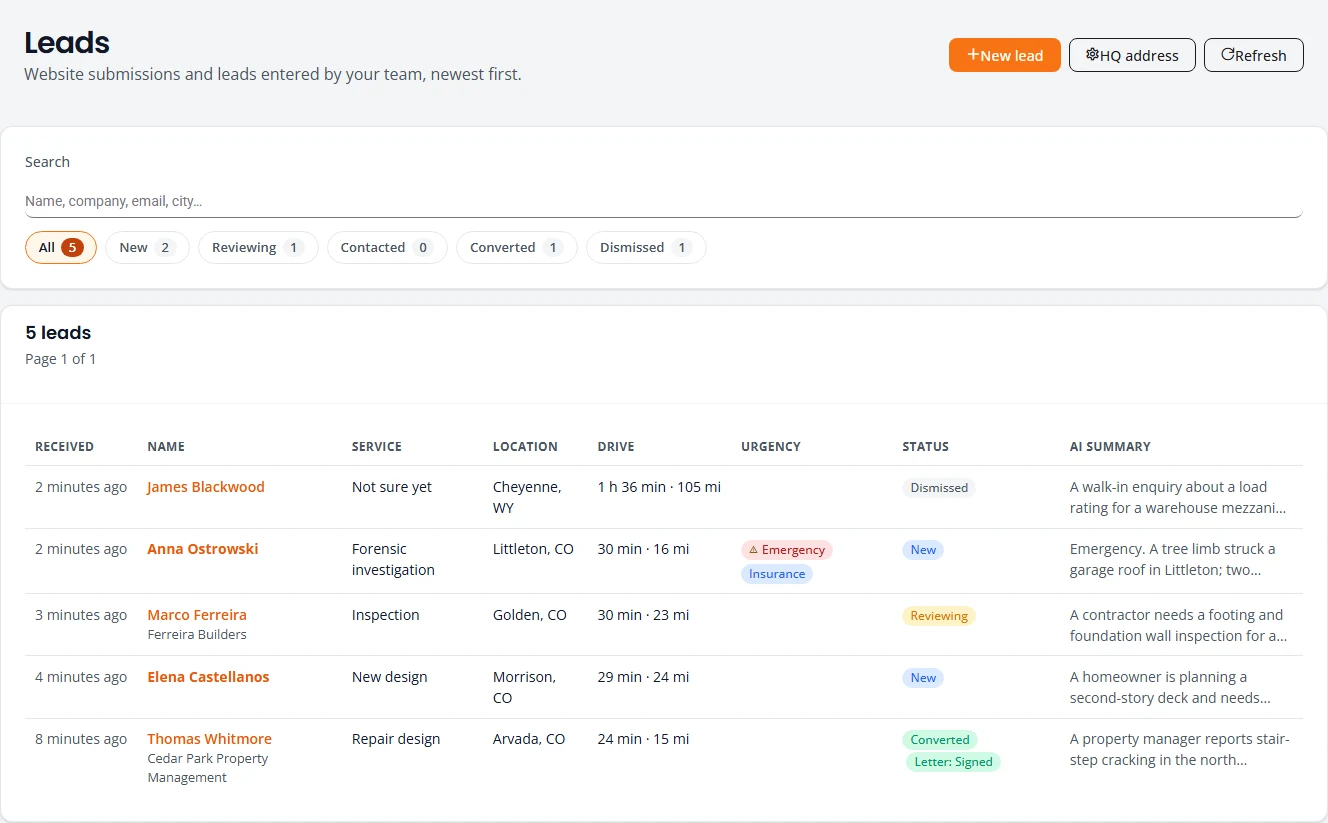
Structra Leads list: each lead with service, location, drive time, urgency tags, status and an AI summary.
Leads, with drive time from the office and engagement letter status. Demo data.
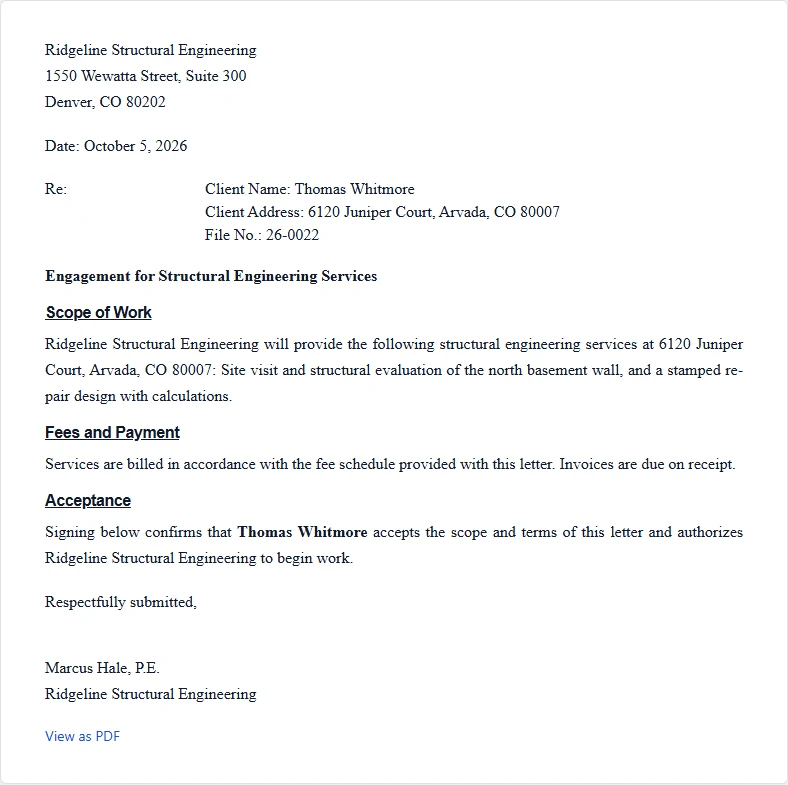
An engagement letter as the customer sees it, on the firm's letterhead, ready to sign online.
The engagement letter your customer signs electronically. Demo data.

Signed, audited, and under your name

Your customers deal with your firm, not with a software vendor, and every signature has a record behind it.

Electronic signatures you can stand behind
The signed PDF ends with a signature certificate: signer name and email, sent, viewed and signed times, IP address and browser, the consent they agreed to, and a SHA-256 fingerprint of the exact letter they signed.
Email from your own domain
Customer email goes out from your address, with your logo, colors and business details. Replies come to your office.
Your letterhead on every document
Engagement letters, cover letters, inspection reports and change order letters. Import the letterhead you already use in Word.
Your engineers' credentials
Each engineer's credentials and stored signature print on the letters they sign.
See Professional pricing

One record for every project, start to finish

Each job moves through the stages your firm already works in. Everyone involved, inside the firm and out, works from the same record.

  1. 01

    Intake

    • Clients submit jobs through their own portal and intake wizard
    • A triage queue for jobs that need a closer look before work starts
    • Website leads arrive with a summary and drive time
  2. 02

    Design

    • Assign designers and engineers; see each person's queue
    • Design capacity calendar with holidays and overrides
    • Drawing checklists, review feedback and revision history
  3. 03

    Inspection

    • Schedule inspections and notify the field team
    • Field inspector portal for drafts and submissions
    • Verify, accept or send back inspection findings
  4. 04

    Delivery

    • Send deliverables by email or Dropbox with a full send history
    • Change orders and revisions tracked against the original job
    • Client comments, with internal notes clients never see
  5. 05

    Billing and reporting

    • QuickBooks Online invoicing with per-client pricing
    • Turnaround, on-time delivery and intake-aging dashboards
    • Capacity and workload reporting for leadership

Administration that holds up at scale

Role-based access
Separate roles for firm staff, client administrators, client office staff and field inspectors.
Client organizations
Each client has its own users and branches, and sees only its own jobs.
Custom fields
Track the scope codes and design parameters your firm uses, and report on them.
Your brand
Client email goes out under your firm's name and domain.
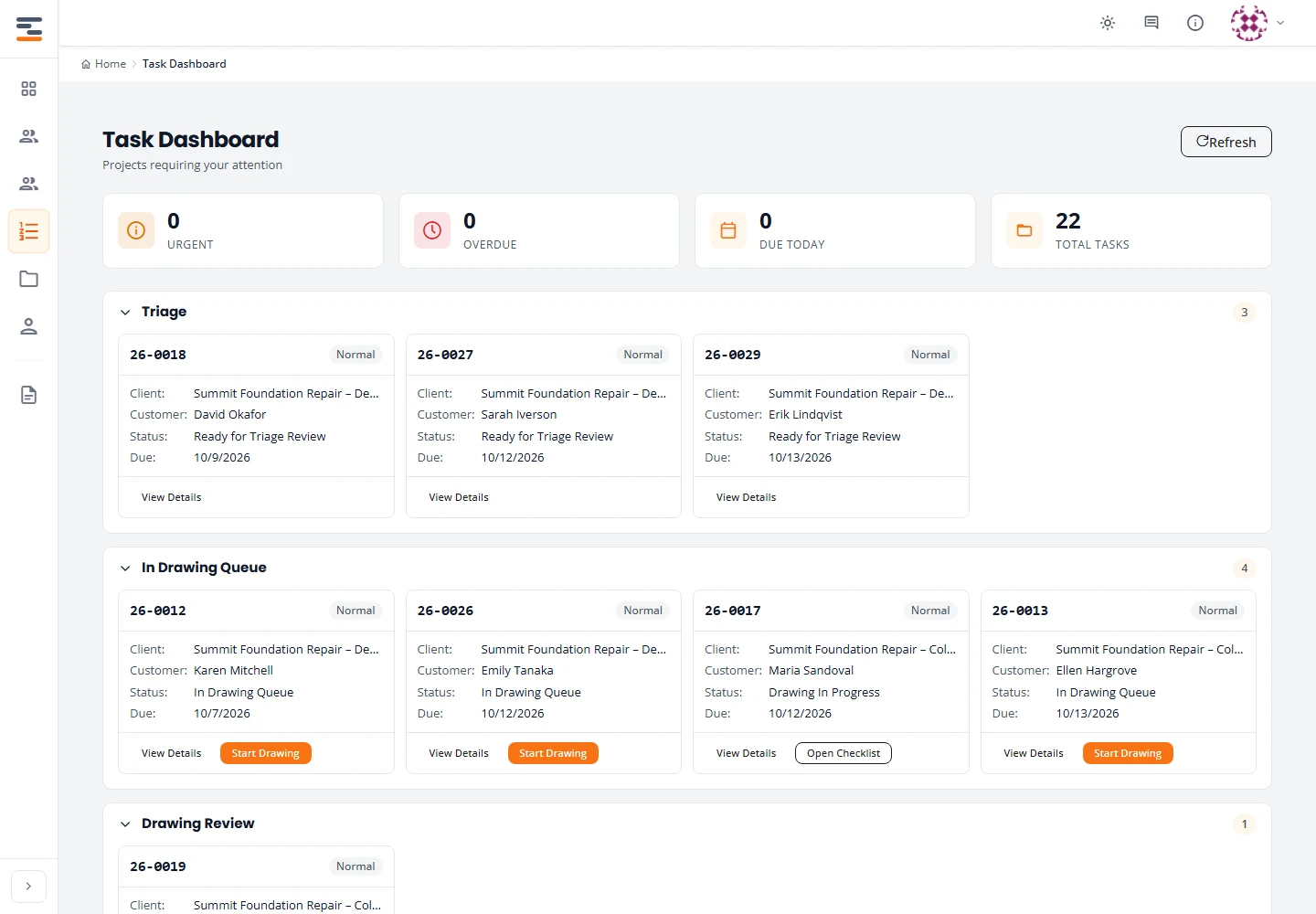
Structra task dashboard: projects grouped by triage, drawing queue and drawing review.
Task dashboard for a design lead. Demo data.

Assistive automation

Automation on the tedious steps. Engineers keep every decision.

Structra uses AI in a few narrow places: checking paperwork, drafting first passes and summarizing what is waiting. It never signs, approves or decides, and work carries on unchanged if it is switched off.

Intake pre-check

Before a reviewer opens a new job, AI compares the contract with the inspection form and flags mismatched names, addresses, product types, quantities, job numbers and dates. Matches stay quiet; only discrepancies surface.

Your reviewer sees a stoplight and makes the call.

Drafting assist

Turns a field sketch into a first-pass plan view with dimensions and labels, then checks its own work: pier counts, dimension sums and orientation. The tedious redraw is done before an engineer starts.

Engineers review and correct. The engineer of record seals.

Rolling out

Lead triage

Website inquiries arrive with a short summary, a map link and the drive time from your office, so you can sort the day's requests in seconds instead of reading every form top to bottom.

You decide who to call and what to quote.

Narrow by design
AI runs on specific, tedious steps. It does not run your workflow.
Always reviewable
Every flag shows what was compared, so a person can confirm it in seconds.
Auditable
Each run records the prompt version, the model and a fingerprint of the documents it read.
Never on the critical path
If the AI is unavailable, work carries on exactly as before. Nothing waits on it.

Security

Ready for your security review

Client records, drawings and reports are your firm's liability. Here is how Structra protects them. We complete security questionnaires on request.

Security overview

Data separation

  • Every record belongs to one firm. Staff see their own firm's work.
  • Client users see only their own organization's jobs, and never the firm's internal notes.

Access control

  • Role-based permissions for firm staff, client administrators, client office staff and inspectors.
  • Passwords are hashed with Argon2id. Field inspectors sign in with one-time codes.
  • Firm and client administrators add, change and deactivate their own users.

Backup and recovery

  • Automated database backups are stored off-site, separate from the production servers.
  • Backups are retained for 35 days.
  • Restores from the off-site copy are tested.

Pricing

Every plan includes the full platform and unlimited users. You pay for the projects you run, not the people who touch them. 14-day free trial.

Small and mid-size firms

Professional

A monthly platform fee with projects included, then a per-project rate that falls as volume grows.

$149per month, platform fee

Per-project rates by monthly volume
projects per monthPrice per project
1–20Included
21–100$9
101–250$7
251+$5
  • Unlimited staff, client and inspector users
  • 20 projects included each month
  • Leads and e-signed engagement letters with an audit trail
  • Email from your domain, documents on your letterhead
  • Delivery by email or Dropbox
  • QuickBooks Online invoicing

Multi-office and high-volume firms

Enterprise

A negotiated agreement sized to your offices and project volume.

Customannual agreement

  • Everything in Professional
  • Annual agreement with volume project rates
  • Invoiced billing
  • Onboarding, workflow configuration and data migration
  • Security questionnaire and vendor review support
  • A named point of contact

Prices in US dollars. A project is counted in the month it is created.

Built inside an engineering firm

Structra was built alongside a practicing structural engineering firm and runs its work every day: intake from contractor clients, design queues, field inspections, stamped reports and invoicing.

Every workflow on this page started as a problem in that office. We release changes to production in small, tested steps, and the people who answer your questions are the people who write the software.

Company
Structra Technologies, LLC
Ownership
Veteran-owned and operated
In production
Daily use at a working structural engineering firm
Support
Direct line to the people who build the product

Talk to sales

Tell us about your firm and we will set up a walkthrough on your own kind of work.

  1. 01

    We reply within one business day

    A person, not an autoresponder.

  2. 02

    A 30-minute walkthrough

    Intake to delivered report, using jobs like yours.

  3. 03

    A written proposal

    Plan, pricing and an onboarding plan for your offices.

We use these details only to reply to you.